2 + 3[1] 5100 - 54[1] 4610 / 4[1] 2.52^3[1] 8(2 + 3) * 4[1] 2016 %% 5[1] 1R is the programming language we will use to build and explore models. This page collects the fundamentals from our first two class meetings. You do not need to memorize every detail; return here when you need a reminder.
Keep your work in an R script—a file ending in .R. Run a line or selected block to send it to the Console.
if block, including both braces, before running it.R can be used as a calculator. The operators +, -, *, /, and ^ perform familiar arithmetic. The %% operator gives the remainder after division. Parentheses control the order of operations.
2 + 3[1] 5100 - 54[1] 4610 / 4[1] 2.52^3[1] 8(2 + 3) * 4[1] 2016 %% 5[1] 1A comment begins with #. R ignores comments, so use them to record meanings, units, and reasoning.
60 * 60 # seconds in one hour[1] 3600Use <- to assign a value to a name. Choose names that communicate what a value represents.
temperature_c <- 20  # degrees Celsius
temperature_f <- temperature_c * 9 / 5 + 32

temperature_c
[1] 20temperature_f[1] 68Names are case-sensitive. temperature_c and Temperature_C would be different names.
Changing an input does not automatically update an answer you calculated earlier. Run the calculation again:
temperature_c <- 25
temperature_f  # still 68
[1] 68temperature_f <- temperature_c * 9 / 5 + 32
temperature_f # now 77[1] 77R can store several kinds of values:
class(temperature_c) # numeric[1] "numeric"class("temperature") # character[1] "character"class(TRUE) # logical[1] "logical"class(46L) # integer[1] "integer"A vector stores multiple values of the same basic type. The c() function combines values, while : and seq() create sequences.
temperatures_c <- c(18, 20, 23, 25, 22)
hours <- 8:12

temperatures_c
[1] 18 20 23 25 22hours[1] 8 9 10 11 12length(temperatures_c)[1] 5Use square brackets to select vector elements. R starts counting positions at 1.
temperatures_c[1] # first value[1] 18temperatures_c[2:4] # positions 2 through 4[1] 20 23 25temperatures_c[c(1, 3, 5)] # selected positions[1] 18 23 22hours[1] # position 1 contains hour 8[1] 8head() and tail() select values from the beginning or end:
head(temperatures_c, 2)[1] 18 20tail(temperatures_c, 2)[1] 25 22The colon operator creates consecutive integers, while seq() lets us choose the starting value, ending value, and step size:
1:5[1] 1 2 3 4 5seq(from = 0, to = 2, by = 0.5)[1] 0.0 0.5 1.0 1.5 2.0R can apply one calculation to every value in a vector.
temperatures_f <- temperatures_c * 9 / 5 + 32
round(temperatures_f, digits = 1)
[1] 64.4 68.0 73.4 77.0 71.6mean(temperatures_c) # 21.6[1] 21.6min(temperatures_c) # 18[1] 18max(temperatures_c) # 25[1] 25sum(temperatures_c) # valid arithmetic, but not a useful temperature[1] 108round() returns a rounded copy; it does not change temperatures_f. To keep rounded values, assign the result to an object. A calculation can also be valid R without being meaningful: sum(temperatures_c) works, but the sum is not a useful temperature measurement.
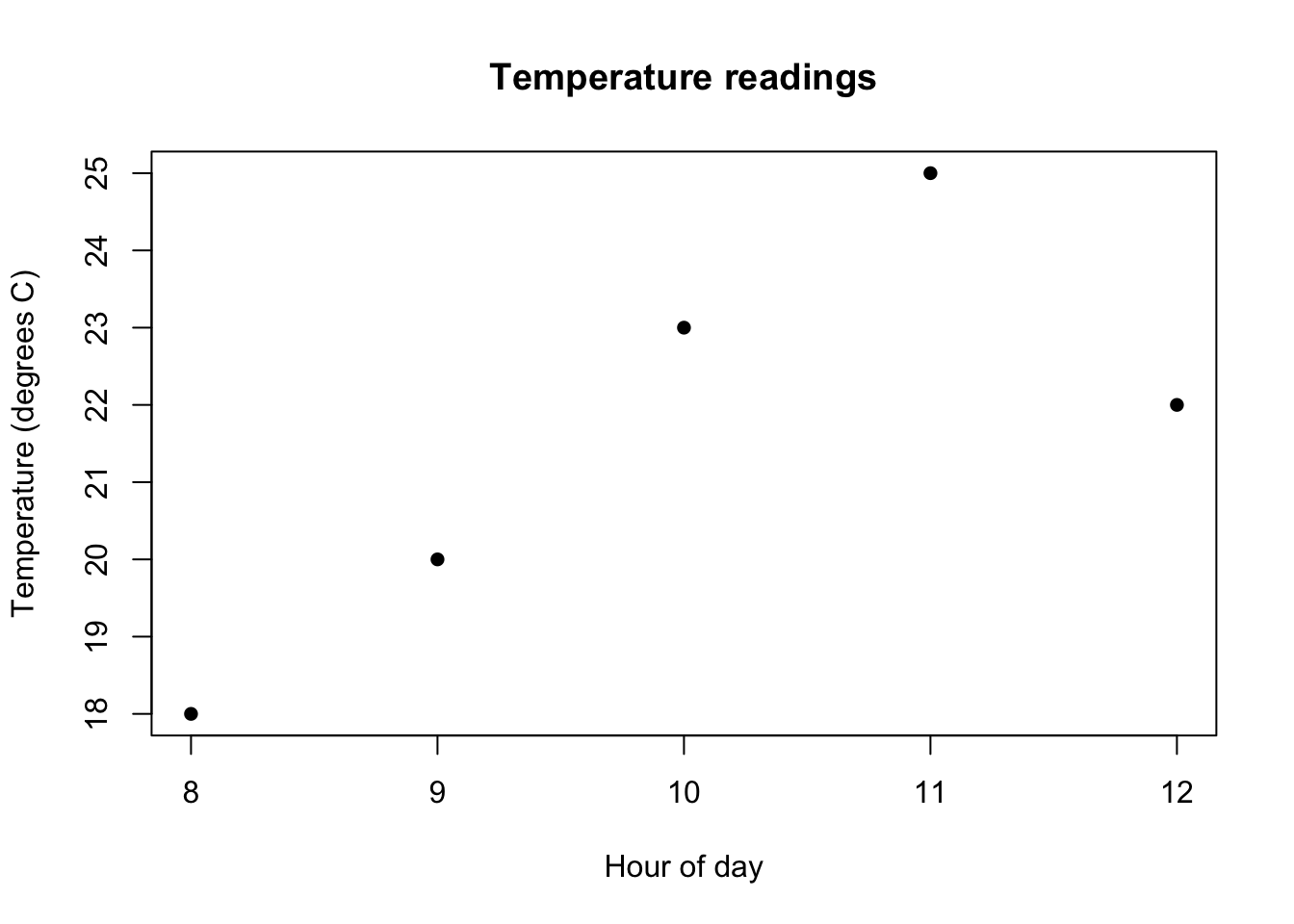
Give plot() horizontal coordinates first and vertical coordinates second. Always label axes and include units when they are known.
plot(
  hours,
  temperatures_c,
  pch = 16,
  xlab = "Hour of day",
  ylab = "Temperature (degrees C)",
  main = "Temperature readings"
)
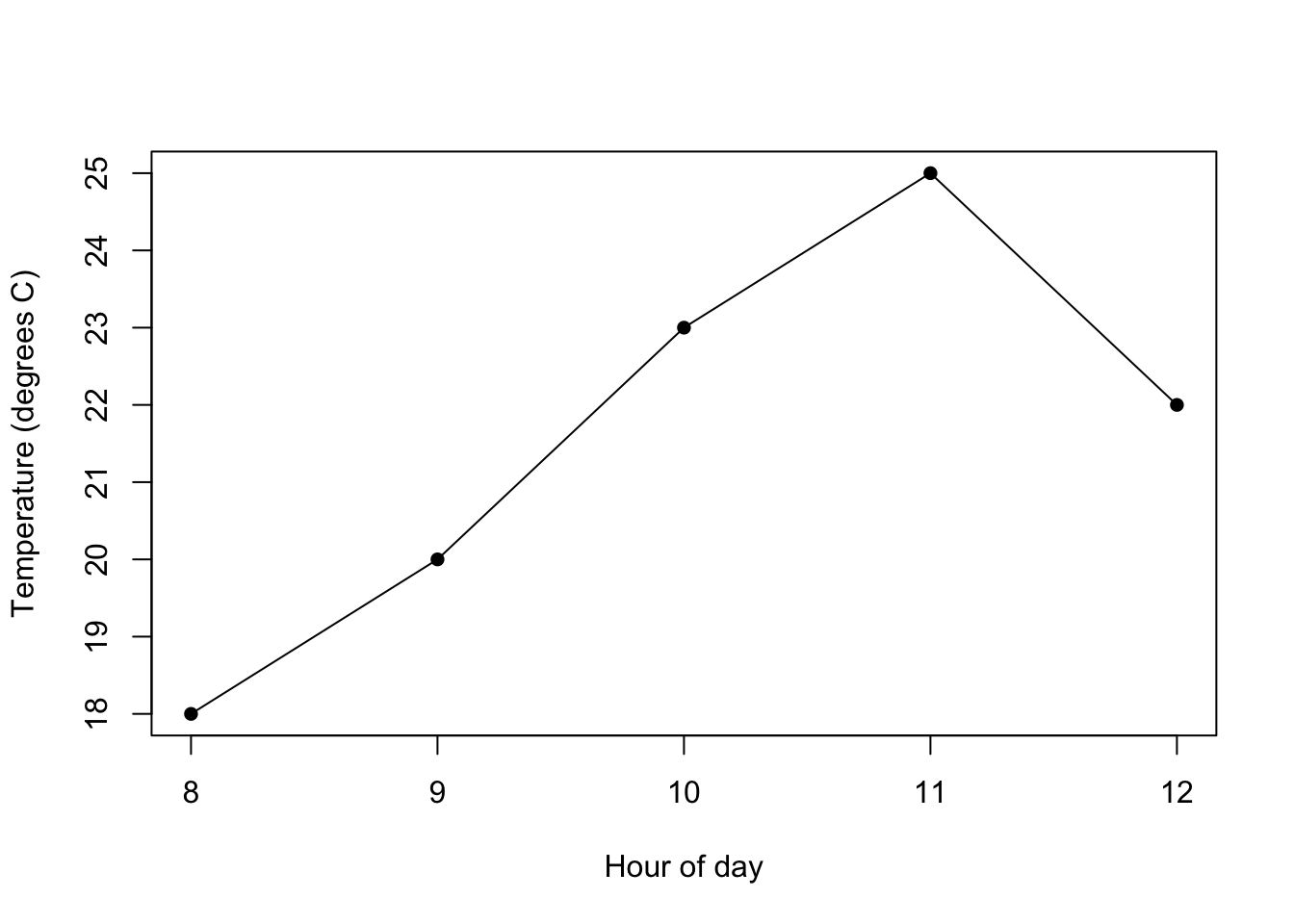
Use type = "o" to show both points and connecting lines. The lines show the order of the measurements; they do not create additional measurements.
plot(
  hours,
  temperatures_c,
  type = "o",
  pch = 16,
  xlab = "Hour of day",
  ylab = "Temperature (degrees C)"
)
A for loop repeats a block of code. This loop visits the values in a vector:
for (reading in temperatures_c) {
  print(reading)
}
[1] 18
[1] 20
[1] 23
[1] 25
[1] 22To save results, create an output vector and fill one position during each iteration.
converted_f <- numeric(length(temperatures_c))
converted_f[1] <- temperatures_c[1] * 9 / 5 + 32

for (i in 2:length(temperatures_c)) {
  converted_f[i] <- temperatures_c[i] * 9 / 5 + 32
}

converted_f
[1] 64.4 68.0 73.4 77.0 71.6Here, i represents a vector position. We calculate position 1 before the loop, then the loop fills positions 2 through the end of the vector. This is the same pattern we use for a simulation with an initial condition.
We can check that the loop and the earlier vector calculation agree:
isTRUE(all.equal(converted_f, temperatures_f))[1] TRUEComparisons produce TRUE or FALSE.
| Operator | Meaning |
|---|---|
== |
equal to |
!= |
not equal to |
< and <= |
less than; less than or equal to |
> and >= |
greater than; greater than or equal to |
Remember: <- assigns a value, while == tests equality.
temperatures_c > 22[1] FALSE FALSE TRUE TRUE FALSEhours == 10[1] FALSE FALSE TRUE FALSE FALSEA logical vector can select the values whose comparisons are TRUE:
temperatures_c[temperatures_c > 22][1] 23 25hours[temperatures_c > 22] # hours 10 and 11[1] 10 11sum(temperatures_c > 22) # count matches: TRUE is 1, FALSE is 0[1] 2if and elseAn if statement chooses whether to run a block of code. Its condition must produce one TRUE or FALSE value.
latest_reading <- tail(temperatures_c, 1)

if (latest_reading > 22) {
  print("The latest reading is above 22 degrees C.")
} else {
  print("The latest reading is at or below 22 degrees C.")
}
[1] "The latest reading is at or below 22 degrees C."The latest reading is exactly 22, so the else branch runs. > does not include equality.
Use any() or all() when a decision depends on several comparisons:
any(temperatures_c > 22)[1] TRUEall(temperatures_c > 22)[1] FALSEif (any(temperatures_c > 22)) {
print("At least one reading exceeds 22 degrees C.")
}[1] "At least one reading exceeds 22 degrees C."+ instead of >R is waiting for the rest of an incomplete expression. You may be missing a closing parenthesis, quote, or brace. Press Escape, repair the code in the script, and run the complete block again.
Select the entire block—including its opening and closing braces—before running it.
Check which object is on each axis, then rerun the calculations that create those objects.